.thm

Batch convert Canon DIGITAL IXUS 970 IS THM photos

Turn a whole shoot of Canon DIGITAL IXUS 970 IS THM files into JPG, PNG, TIFF or PDF in one batch. Contenta Converter can also resize, rename and watermark each photo in the same pass.

Download free trial — convert THM now See all features →

$129 one-time. No subscription, no per-image fees.

  • Free trial, no time limit
  • Keep 10 results clean
  • Windows 10/11
  • Works offline
  • 100,000+ users worldwide
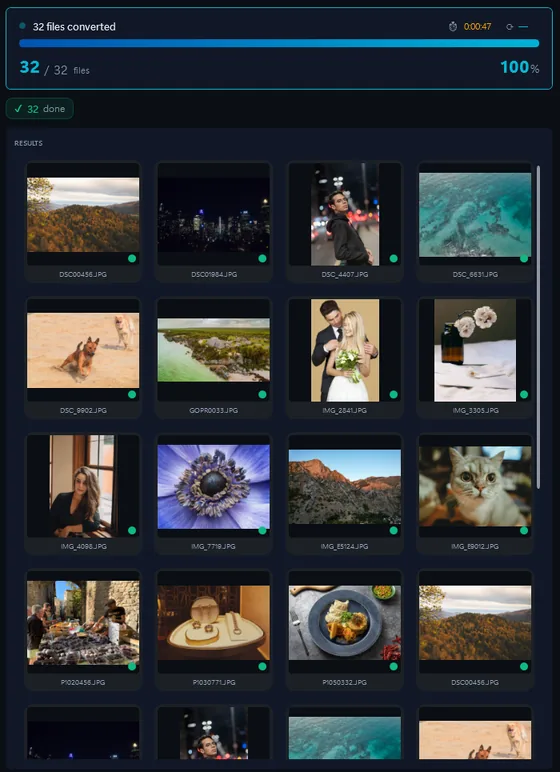
Contenta Converter results screen showing 32 converted photos and a before and after preview
The results screen of Contenta Converter: 32 photos converted in 47 seconds, with a before and after preview.
  1. Download the trial and install it on Windows 10 or 11.
  2. Drop your THM files, or a whole folder, into Contenta Converter.
  3. Pick JPG, PNG, TIFF or PDF and click “Start Converting”.

The same photo, five outputs

Photo of a stage set with a bed, a small table and a checked sofaDSC_0001.NEF · 3900×2613
  • PNG.png1.9 s
    16.1 MB
  • AVIF.avif2.2 s
    2.02 MB
  • JPG.jpg1.7 s
    1.69 MB
  • WebP.webp1.7 s
    1.32 MB
  • JPEG XL.jxl1.7 s
    1.12 MB
One Nikon D60 RAW file converted to five formats, at quality 90 where the format has a quality setting. PNG is lossless, so it is the largest. Seconds are the median of three runs. Measured with the Contenta Converter 9.0.35 command line on an AMD Ryzen 9 3900X, 2026-09-30.

Opens from this camera:THMJPG

Converts to:JPGPNGTIFFPDFWEBPHEICAVIF

THM | JPG |

Canon DIGITAL IXUS 970 IS THM — Convert, Resize & Organize

Information about the format: THM

Format THM
Company
Description THM files are thumbnail images generated by digital cameras and phone cameras. A .thm file pairs with a video or photo to provide a fast preview for playback menus — you'll see them in DCIM folders on Canon, GoPro, Sony, and many other cameras. Most are just renamed JPEGs at low resolution (160×120 to 640×480). Contenta Converter PREMIUM opens .thm files directly and batch-converts them to standard JPEG.
Benefits Useful for recovering video previews when the main video file is missing or corrupt. Essentially JPEG under the hood — converts quickly and losslessly to standard .jpg.
Drawbacks Low resolution (previews only, not the original footage). Most image viewers and social platforms reject the .thm extension without conversion. Nothing in the preview was editable — the real media sits in the paired video file.
60+
Image Formats
100K+
Happy Users
35+
Effects & Filters

Users reviews:

“I have been using Contenta Converter for years and it has saved me countless hours of work. Highly recommended!”

“Simple, fast, and does exactly what it promises. The batch processing is incredibly efficient.”

“Best image converter I have found. The RAW support and metadata handling are top-notch.”

Trusted by 100,000+ users worldwide
Contenta Converter PREMIUM Windows

Satisfaction Guaranteed:

Professional photo conversion and processing.
Trusted by photographers, designers, and businesses worldwide.
Totally risk free. After purchase, you have a 30-day money back guarantee.

Other cameras from this brand

Canon PowerShot SD880 IS Canon IXUS 130 Canon EOS DIGITAL REBEL XTi Canon PowerShot G1 Canon EOS Kiss Digital Canon EOS 7D Canon EOS 10D Canon PowerShot A420 Canon EOS 500D Canon EOS 550D Canon EOS 5D Mark II Canon DIGITAL IXUS 95 IS Canon EOS-1D Mark IV Canon EOS 20D Canon EOS 300D DIGITAL Canon PowerShot SD1400 IS Canon EOS-1D X Canon EOS REBEL T2i Canon EOS D30 Canon EOS REBEL T1i Canon EOS DIGITAL REBEL Canon PowerShot A450 Canon IXY DIGITAL 70 Canon PowerShot A530 Canon PowerShot SX210 IS Canon IXY DIGITAL 1000 Canon PowerShot SD630 Canon PowerShot A3000 IS Canon DIGITAL IXUS 120 IS Canon PowerShot S70 Canon EOS 60D Canon PowerShot A480 Canon EOS 350D DIGITAL Canon IXUS 300 HS Canon PowerShot G10 Canon LEGRIA HF M52 Canon PowerShot SX110 IS Canon PowerShot G3 Canon PowerShot G5 Canon PowerShot A470 Canon DIGITAL IXUS 860 IS Canon DIGITAL IXUS 870 IS Canon PowerShot SD750 Canon PowerShot SX100 IS Canon IXY DIGITAL 50 Canon PowerShot A640 Canon EOS REBEL T4i Canon PowerShot A650 IS Canon PowerShot D10 Canon PowerShot S30 Canon DIGITAL IXUS 55 Canon PowerShot A590 IS Canon PowerShot SX20 IS Canon PowerShot A1000 IS Canon PowerShot A620 Canon DIGITAL IXUS 85 IS Canon EOS 5D Mark III Canon DIGITAL IXUS 750 Canon DIGITAL IXUS 75 Canon DIGITAL IXUS 960 IS Canon PowerShot SD1200 IS Canon PowerShot A100 Canon PowerShot A40 Canon PowerShot G2 Canon PowerShot SX200 IS Canon DIGITAL IXUS 300 Canon EOS 5D Mark IV Canon PowerShot A550 Canon DIGITAL IXUS 400 Canon EOS REBEL T3 Canon IXUS 105 Canon PowerShot A80 Canon PowerShot S200 Canon PowerShot SD780 IS Canon PowerShot SX10 IS Canon MD160 Canon PowerShot SD1300 IS Canon PowerShot A3100 IS Canon PowerShot S50 Canon DIGITAL IXUS 60 Canon PowerShot A460 Canon PowerShot A495 Canon DIGITAL IXUS 80 IS Canon EOS Kiss X3 Canon PowerShot S60 Canon PowerShot SD300 Canon PowerShot SX120 IS Canon DIGITAL IXUS 50 Canon DIGITAL IXUS v2 Canon EOS Kiss X4 Canon MVX200(i) Canon PowerShot A560 Canon DIGITAL IXUS 100 IS Canon IXY DIGITAL 910 IS Canon PowerShot A400 Canon PowerShot A700 Canon PowerShot G11 Canon DIGITAL IXUS 65 Canon DIGITAL IXUS 950 IS Canon DIGITAL IXUS 970 IS Canon IXUS 210 Canon IXY DIGITAL 110 IS Canon IXY DIGITAL 800 IS Canon IXY DIGITAL 930 IS Canon PowerShot A430 Canon PowerShot A540 Canon PowerShot A580 Canon DIGITAL IXUS 110 IS Canon DIGITAL IXUS 70 Canon DIGITAL IXUS 700 Canon IXY DIGITAL 200 Canon PowerShot S5 IS Canon PowerShot SD870 IS Canon DIGITAL IXUS 500 Canon DIGITAL IXUS 800 IS Canon DIGITAL IXUS 90 IS Canon EOS D60 Canon EOS DIGITAL REBEL XT Canon PowerShot A2000 IS Canon PowerShot G6 Canon PowerShot SD1000 Canon PowerShot SD1100 IS Canon DIGITAL IXUS 200 IS Canon DIGITAL IXUS 40 Canon DIGITAL IXUS 850 IS Canon DIGITAL IXUS i7 zoom Canon DIGITAL IXUS IIs Canon IXUS 107 Canon IXY DIGITAL 220 IS Canon IXY DIGITAL 40 Canon IXY DIGITAL 60 Canon IXY DIGITAL 600 Canon PowerShot A1100 IS Canon PowerShot A200 Canon PowerShot A410 Canon PowerShot A490 Canon PowerShot A520 Canon PowerShot A570 IS Canon PowerShot A630 Canon PowerShot A720 IS Canon PowerShot G7 Canon PowerShot G9 Canon PowerShot Pro1 Canon PowerShot S2 IS Canon PowerShot S3 IS Canon PowerShot S40 Canon PowerShot S45 Canon PowerShot S90 Canon PowerShot SD450 Canon PowerShot SD600 Canon PowerShot SD890 IS Canon PowerShot SD900 Canon PowerShot SD950 IS Canon PowerShot SD960 IS

Frequently Asked Questions

What image formats does the Canon DIGITAL IXUS 970 IS produce?

The Canon DIGITAL IXUS 970 IS produces THM files. You can convert these to JPG, TIFF, PNG, PDF, WEBP, and many other formats using Contenta Converter PREMIUM.

How do I convert Canon DIGITAL IXUS 970 IS photos?

Download Contenta Converter PREMIUM, drag and drop your photos, choose the output format, and click Convert. It supports batch conversion of hundreds of files at once.

Does Contenta Converter support RAW files and metadata?

Yes. Contenta Converter PREMIUM reads RAW files from most popular camera brands and can preserve or update IPTC/XMP metadata such as copyright, location, and descriptions during conversion.

Can I add a watermark to my Canon DIGITAL IXUS 970 IS photos?

You can add text or image watermarks to all your photos in one step. Contenta Converter PREMIUM lets you choose position, opacity, and size so your branding looks consistent on every export.

Is Contenta Converter free to try?

Yes. The trial has every feature and no time limit. Pick up to 10 results to keep clean; the rest carry a small watermark. Buying a license removes the watermark.

Ready to convert your photos? Download Free Trial